---
title: "Concierge Fire Typeform Integration"
source_url: https://help.chilipiper.com/hc/en-us/articles/36067096571411-Concierge-Fire-Typeform-Integration
article_id: 36067096571411
updated_at: 2026-04-22T15:09:17Z
---
## Who can use this feature?
Available on All Products or Routing & Scheduling
Available to Admins or Workspace Managers
[Billing Center](https://fire.chilipiper.com/fire/admin/billing/overview) [Get a Demo](https://www.chilipiper.com/request-demo?utm_source=zendesk&utm_medium=help-center&utm_campaign=chili-hub)
In this article, we will discuss integrating Concierge Fire with Typeform. Typeform + Chili Piper enables your qualified leads to book meetings directly with your reps after they submit a form.
_**Note** : This integration is available for Typeform customers on the **Plus** plans and above, as the Redirect feature is required._
* * *
#### Table of Contents
* Create your Typeform
* Create a thank you page
* Add redirect page to your Typeform template
* Map your form fields on the router
* * *
## Create your Typeform
The first step is to create a form in Typeform. This can be done either through a custom or existing template or from scratch. **Based on your Typeform license type, the way this looks may differ slightly.**
The key takeaway is that you should include all of the questions (fields) that you would use in your rules for routing or CRM updates.
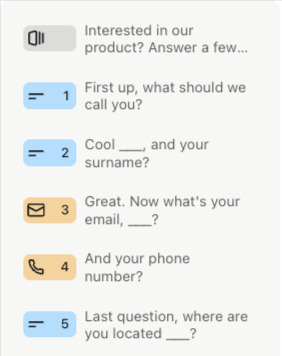
In the above example, we are walking a user through questions that ask for First Name, Last Name, Email, Phone number, and Country. You can add any questions you like, but Email is **required** for this to work.
* * *
## Create a Thank You Page
Create a thank you page on your website, or you can use an existing one that we will redirect to in Typeform. The magic happens when the following snippet of javascript is added to this thank you page:
You can find this code in your [Concierge Router's](https://help.chilipiper.com/hc/en-us/articles/28522554434323-Creating-a-Concierge-Router-in-Demand-Conversion-Platform) "**Embed** " section in the flow builder by clicking "On a Website" and select "Typeform" from the Form Type dropdown. Remember to **Copy** the snippet. 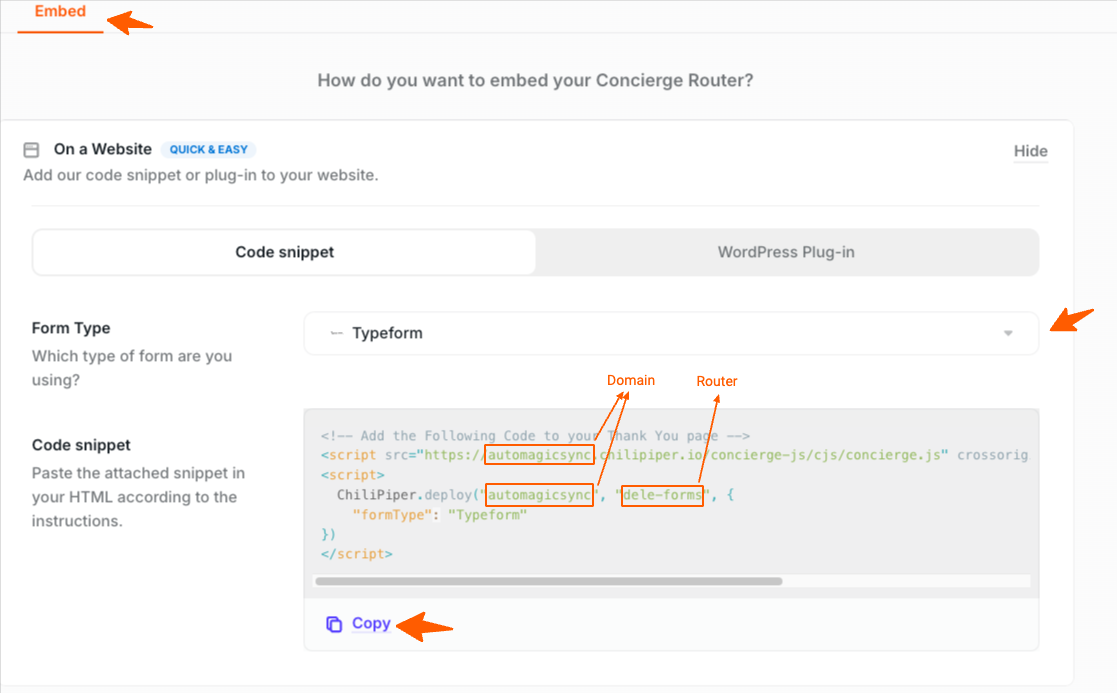
In the screenshot above, _automagicsync_ is the domain name, and, _dele-forms,_ is the router name.
We would recommend that you include this snippet in your web page's footer section.
* * *
### Add a Redirect Page to your Typeform Template
Now that we have that thank you page ready, we will redirect prospects to it when they fill out the form.
In the template settings in Typeform, you should be able to **redirect on completion**. For more details, refer to this Typeform [article](https://www.typeform.com/help/a/end-screens-and-redirects-360051791392/#h_01G0CFXF21W2EQ8PXKSB4KSC8P).
The URL we enter here will include several variables. In our example below, note we include FirstName, LastName, Email, and Country as the values we want to route.
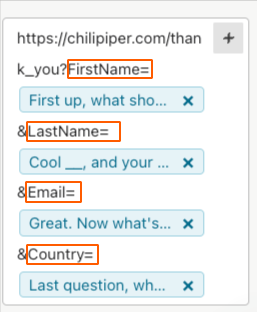
The dynamic tags above (shown in green) are generated based on the questions you have asked in the Typeform. **Depending on your Typeform license, the look of these tags may differ slightly.**
_**Important Note**_
**Email** with **E** as an upper case is required for this to work. You can include or leave out any fields you don't need, but Email is required with the capital E.
The Chili Piper script will **not run** if an Email address is not provided, so that we do not error out and cause a meeting to be booked where no calendar invite is sent to the customers/prospects.
You can also use the "**queryVariable** " to share required data that has not been captured, or if you need to use the email field with a different name.
* * *
### Map your form fields on the router
You must ensure that the **Form field names** here match the URL field names used in the screenshot from the previous section. Note that capitalization matters.
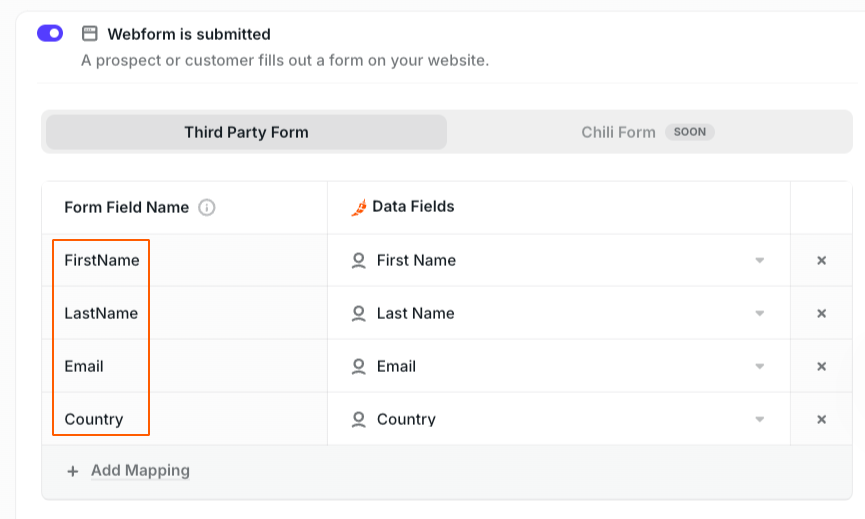
Please take a look at[ this article](https://help.chilipiper.com/hc/en-us/articles/28929554231187-Form-Mapping-in-Demand-Conversion-Platform-s-Concierge) for more information on form mapping.
You are all set once this is done, and that script is on the thank you page!