---
title: "Common Ways to Prevent Webform Spambots"
source_url: https://help.chilipiper.com/hc/en-us/articles/16929075313939-Common-Ways-to-Prevent-Webform-Spambots
article_id: 16929075313939
updated_at: 2025-06-25T17:44:16Z
---
A Spambot is a computer program created to collect data from online sources such as webforms and websites. Protecting your forms from spambots is a challenging mission, but there are some simple actions that you can take to help you with this process.
* * *
## How can I prevent Spambots?
### Use CAPTCHA
CAPTCHA (Completely Automated Public Turing test to tell Computers and Humans Apart) is a tool that you can use to differentiate between real prospects and automated bots. It provides some actions that are easy to perform by humans but difficult for bots such as identifying stretched letters or numbers, or clicking in a specific area. You can implement this by following the steps provided by Google [here](https://www.google.com/recaptcha/about/).
### Create a queue rule to exclude public domains
You can create some queue rules to prevent specific domains (such as @gmail.com, @yahoo.com, @comcast.net, etc) from booking a meeting through your forms. You can achieve that by adding a rule per domain you would like to exclude in your queues using the _not contains_ operator, like this:
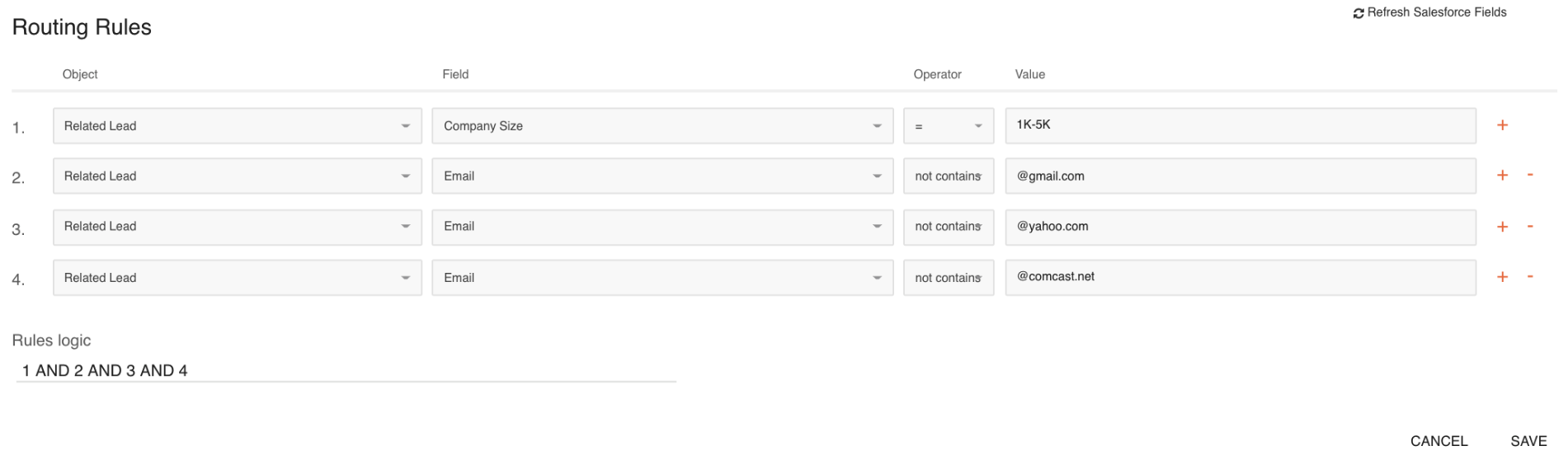
Notice how the logic says: 1 AND 2 AND 3 AND 4, since a business email domain will not contain all of the public domains listed in Rules 2-4.
We have also simplified this process by adding the "ContainsNoneOf' operator. Now, you can create comma-separated lists of domains, e.g.:
### Implement Specific Validations In Your Webform
Your development team can implement specific validations directly in your webform based on your business needs or create some required fields (block the submission if the email address is missing the ".com" part, for example).
### Block Specific Domains Using Your Chili Piper's Snippet
_****_**Lead/Contact Assignment**
For blocked Leads and Contacts, Chili Piper will not be able to perform the said function through the "Queues for prospects who didn't take action" setting due to this anti-spam block.
You can incorporate a measure to identify and filter out unwanted or malicious submissions by customizing your Chili Piper JS Code to include filtering mechanisms or special parameters that prevent spam emails upon form submission.
The anti-spam code may vary depending on the type of form solution that you’re using for your webform. Forms like Pardot and Marketo may have a different method for implementation but generally, the codes are tailored to validate specific email addresses or domains and flag them as spam as soon as an attempt to book is made.
Before implementing, please don't hesitate to contact your CSM or Support if you have any questions about this.
#### Chili Piper Scheduling
#### Marketo
const tenantSubdomain = "subdomain"; // replace with your subdomain
const tenantRouter = "router_name"; // replace with your router's name
MktoForms2.whenReady(function(form) {
form.onSuccess((values) => {
console.log(values);
// Lists e-mails and/or domains to be excluded
if (
values["Email"].toLowerCase() !== "name@domain.com" &&
values["Email"].toLowerCase() !== "name2@domain.com" &&
values["Email"].toLowerCase().indexOf("domain.net") === -1 &&
values["Email"].toLowerCase().indexOf("domain.com") === -1
) {
// If not in the list above, submit the form data to Chili Piper
ChiliPiper.submit(tenantSubdomain, tenantRouter, { map: true, skipFormFallback: true, lead: values });
} else {
// If in the excluded list, redirect the user to a different page
window.location.replace("https://chilipiper.com");
}
return false;
});
});
#### Hubspot Forms