---
title: "Adding Script to Your Contact 7 Form in Wordpress"
source_url: https://help.chilipiper.com/hc/en-us/articles/360053853334-Adding-Script-to-Your-Contact-7-Form-in-Wordpress
article_id: 360053853334
updated_at: 2026-07-24T18:56:02Z
content_hash: 42705ced
---
Using Contact 7 forms in Wordpress is quite easy and can be done with one script.
The reason we use a custom script for this implementation is because Contact 7 does validation of the form fields (eg, confirming the email address is valid), and we want this to happen before Chili Piper shows a calendar.
## Add this script to your Contact 7 page
Contact 7 provides several other DOM event messages, in case you want to trigger Chili Piper at a different time. For more information on this, [check out their article here](https://contactform7.com/dom-events/).
In the code below, we are using "**wpcf7mailsent**" because this means that the form submitted successfully, and an email was sent successfully.
```
```
Using the above code, be sure to replace "**account_domain**" and "**router_name**" with their respective values from the Inbound Router's embed section, but remember we are otherwise replacing this code!
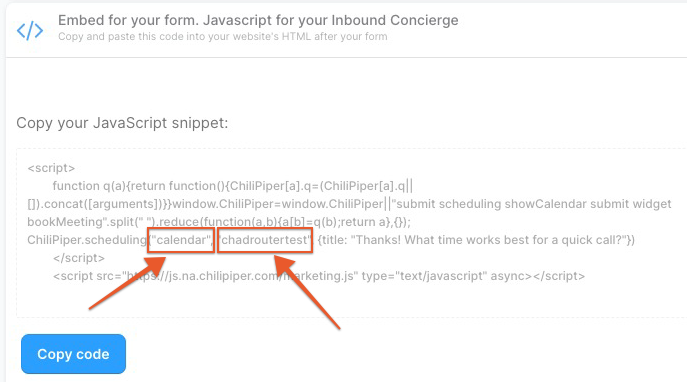
###
### Troubleshooting
Should the Chili Piper code not run and throw an error in the console:

Then trying the example code below may help resolve this issue
```
```