Picked slots to offer as availability -> Prospect said "time is no longer available"

I used Gmail’s “Insert Availability” feature and manually selected times that worked for me. Some of those times overlapped with events already on my Google Calendar, but I wanted to offer them anyway since I’d be willing to reschedule those conflicts if the prospect picked one.
The prospect replied: “When I click on some of the available options, it says ‘time is no longer available.’”
I haven’t scheduled anything new between when I sent my availability and when she responded.
Question: How can I use the “Insert Availability” feature to manually propose time slots—even if they conflict with my current calendar—so the recipient can book them and move my other commitments?
-

Hey Erika!
Hope this message finds you well! Great question!
You may want to use our Priority Scheduling feature to add some events to that logic, where you will be able to "tell Chili Piper" what to do if a priority meeting is booked at the same time of certain events.
While using Suggested Times and after configuring the required events in Priority Scheduling, ensure to toggle the following setting below. This way, prospects should be able to book over that slot, while Chili Piper will either reschedule or cancel the conflicting event, or keep both based on your Priority Scheduling setup.
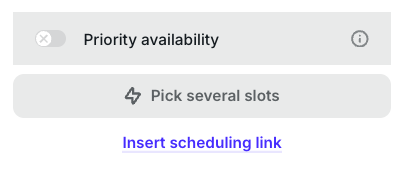
Please don't hesitate to contact us again if you need any further clarification. We'll be happy to help!
I hope you have a great day and a wonderful week ahead!
0
Please sign in to leave a comment.
Comments
1 comment