Custom location not merging fields correctly

When a meeting type has a custom location it is showing up strangely like this:
{! Custom
any text added in the location
Merge fields don't work in it either. Ex:
{! Custom
{!CP.Host.FirstName} will call you when you're ready.
-

Hey Murph!
Could you please share more details about where you noticed this?
Was it in any meeting invite, or is it in-app? If it was a meeting invite, can you share any details about it so I can try finding it in our logs?
0 -
Any meeting invite that is booked through Concierge shows up like this:
This is happening when using the standard Concierge router embed "On a Website" for a lead form.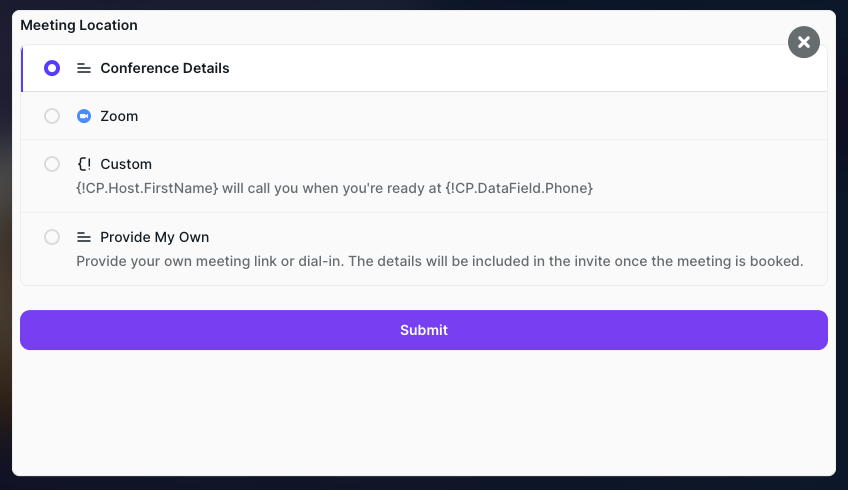 0
0 -
Hey Murph
Could you please send me the landing page or link where this is seen?
I tried finding and replicating, but could not so far.
0 -
I took it off of production because of it so it's not live but here is our staging page https://withprimer.webflow.io/get-started---chili-piper-test-page-copy
On form submit the concierge scheduler loads and it doesn't load the data fields in the custom meeting location. Please use test in the name and email so it does create a lead in our actual CRM.
0 -
Thank you, Murph! I see what's happening!
Our Engineering Team was already notified about this issue and currently has an internal ticket to work on this.
I will generate a support ticket from our conversation, so I can keep you informed once the fix is deployed to your environment. If you need to use this instantly, we can try changing the working of the Custom Location to "We will call you at the provided phone", or anything similar that doesn't rely on the Dynamic Tag.
I will say hello in the support ticket in a few, so you can find it as well.
Thanks in advance for your patience while we are working on this, and I hope you have a great day ahead!
0
Please sign in to leave a comment.
Comments
5 comments